
Admin API Keys
Account- and environment-scoped keys for programmatic administration, and the Bearer credential for the management MCP server.
Coming soon
An Admin API key is scoped to your account and a single environment. Use it for programmatic administration and as the Bearer credential for the management MCP server.
It is also the intended credential for the account-wide /api/platform/v1 API - see the Custom Components API. Those operations act on the whole tenant rather than one workspace or environment.
Coming soon
Enforcing that - rejecting a workspace or embedded API key on /api/platform/v1 - is on the upcoming release track. In the latest released version any API key valid for the environment authenticates there, and access is decided by the owning user's admin authority alone.
Availability
Admin API keys are Enterprise Edition, behind the ff-1024 feature flag. When the flag is off, the page is hidden from the Settings sidebar.
ByteChef issues a second kind of key as well: workspace API keys, scoped to a workspace and an environment, for the automation public API. Both pages share the same layout, dialogs, and actions; they differ only in scope and where they live in Settings.
The page
Settings → Admin API Keys is headed "Use Admin keys for programmatic administration of your account. Do not share your API key with others or expose it.", with - once at least one key exists - a New API Key button. A key belongs to the environment selected in the left sidebar header.
With no keys yet, the body shows an empty state titled No API Keys with the message "Get started by creating a new API key." and a New API Key button.
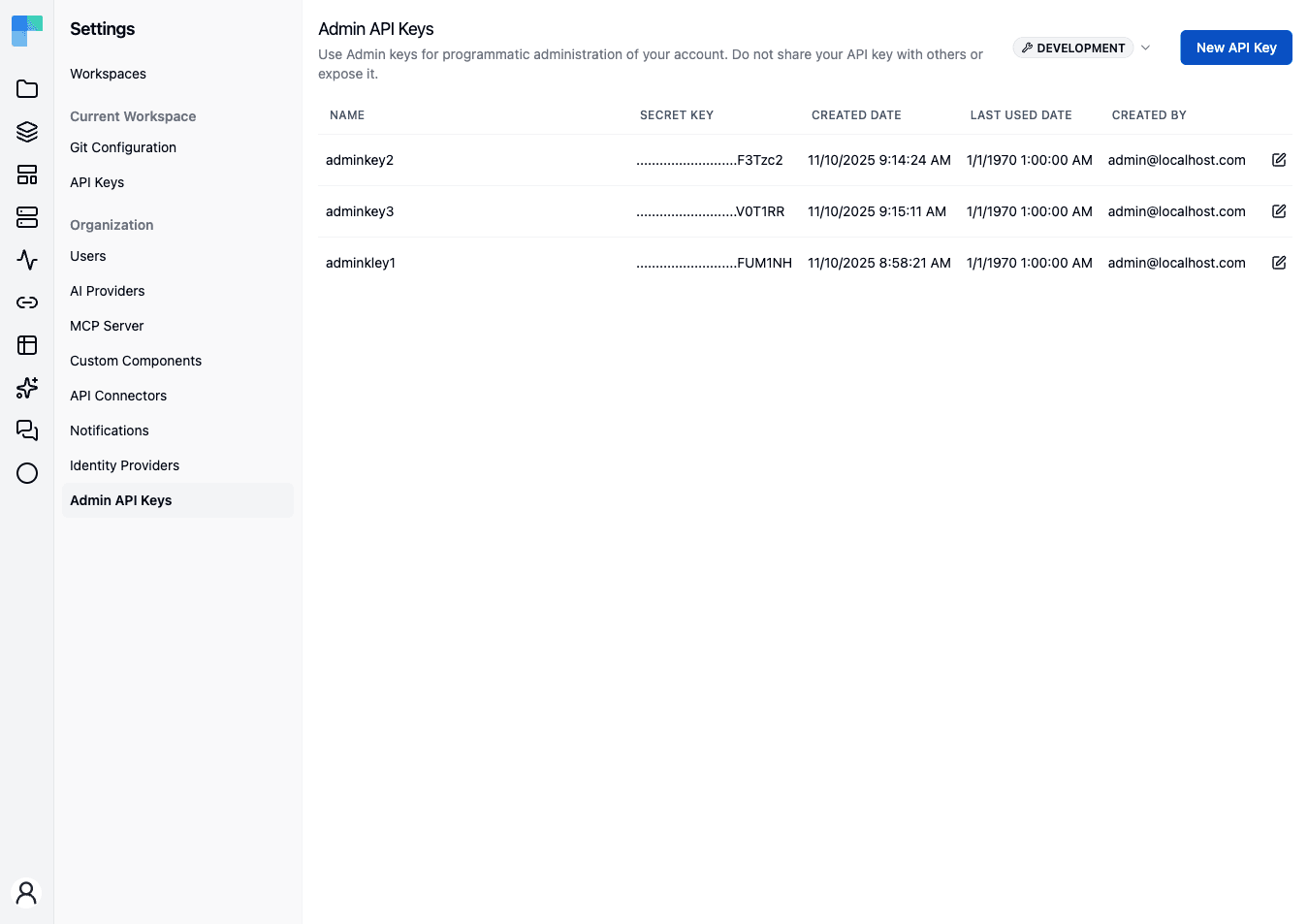
| Column | Description |
|---|---|
| Name | The label you gave the key. |
| Secret Key | A masked preview - the full secret is shown only once, at creation. |
| Created Date | When the key was created. |
| Last Used Date | When the key last authenticated a request. |
| Created By | Who created it. |
Each row ends with an edit (pencil) and a delete (trash) icon.
Environments
Every key is bound to the environment active in the Environment selector at the moment it is created. Keys created against one environment do not authenticate calls made against another. Switching the selector re-lists the keys for that environment.
Create a key
- Confirm the Environment selector is set to the environment the key should be bound to.
- Click New API Key.
- In the Create API Key dialog, enter a Name of at least 2 characters.
- Click Create API Key.
The dialog switches to the Save your API Key view and shows the full secret exactly once:
Please save this secret key somewhere safe and accessible. For security reasons, you won't be able to view it again through your ByteChef account. If you lose this secret key, you'll need to generate a new one.
- Click Copy - a "The secret API key is copied." confirmation appears - store the secret somewhere safe, then click Done.
The key appears in the table showing only its masked preview from this point on.
Rename a key
Click the edit (pencil) icon, change the Name in the Edit API Key dialog, and click Save. Only the name changes; the secret is unaffected.
Revoke a key
Deleting a key is how you revoke it - there is no enable/disable toggle.
Click the delete (trash) icon and confirm in the Are you absolutely sure? dialog ("This action cannot be undone. This will permanently delete the API key."). Any client presenting the deleted key is rejected immediately. Keys are independent, so deleting one client's key does not affect any other.
Creation and deletion are recorded in the audit log as API_KEY_CREATED and API_KEY_DELETED.
Using a key with the management MCP server
An Admin API key is the default credential for the management MCP server. When the server's Require authentication setting is on, send the key as a Bearer header on every request:
Authorization: Bearer <your-api-key>The key is bound to an environment, so requests must target the same one via the X-ENVIRONMENT header. That header defaults to PRODUCTION when omitted, and an unrecognised value is rejected as bad credentials rather than falling back.
Because the key is tied to your account, the assistant acts with your permissions - and you can revoke a single client by deleting its key, without touching the server URL or the other clients. See MCP Server for the full setup.
How is this guide?
Last updated on
Component Visibility
Curate which components - and which of their actions and triggers - builders can see and run, enforced at listing time and again at execution time.
Audit Events
The audit log of privileged actions - who did what, and when - with filtering, per-event data, and configurable retention.