
Identity Providers
Register SAML 2.0 and OIDC identity providers so authentication, group membership, and de-provisioning happen in your IdP.
Coming soon
Enterprise SSO replaces ByteChef's local user store with your existing identity provider, so identity, group membership, and de-provisioning are managed in one place rather than in a second directory kept in sync by hand.
Availability
External identity provider federation is an Enterprise Edition feature, enabled with bytechef.security.sso.enabled (BYTECHEF_SECURITY_SSO_ENABLED). The Settings → Identity Providers page is behind the ff-1040 feature flag and requires the ADMIN authority. Community Edition ships local email/password login, plus optional social login with Google and GitHub.
Protocols
Both protocols are first-class:
- SAML 2.0 - assertion-based SSO, typical of ADFS, Shibboleth, and other large-enterprise IdPs.
- OIDC / OAuth 2.0 - for OIDC-native IdPs such as Okta, Auth0, Google Workspace, Keycloak, and Azure AD / Entra ID.
If your IdP advertises a SAML metadata URL or an OIDC discovery document, it will plug in.
Providers are registered at runtime - metadata URLs, client IDs, secrets, and attribute mappings are all admin-editable without a redeploy. That matters most for multi-tenant deployments where each tenant brings its own IdP, and for onboarding a new identity domain without an outage window.
The providers list
Settings → Identity Providers lists configured providers with these columns: Name, Type, Issuer / Metadata URI, Domains, Status, Enforced, and MCP, plus per-row edit and delete actions. Add Identity Provider opens the configuration dialog.
Configuring a provider
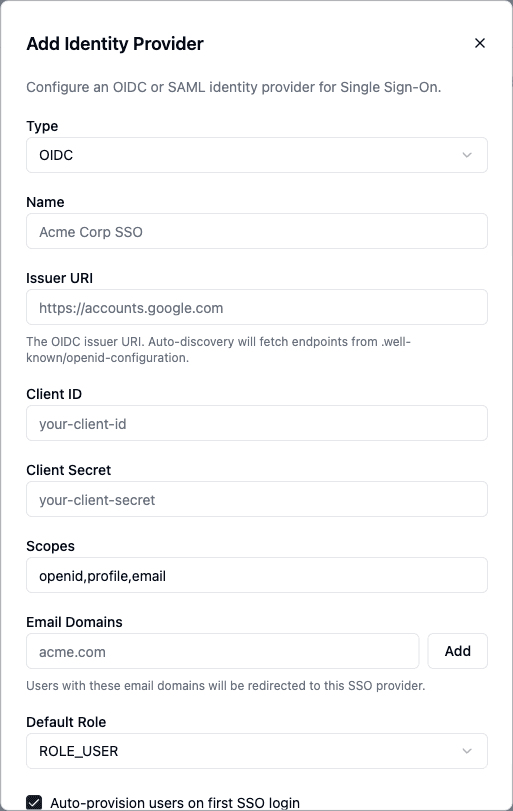
The dialog is titled Add Identity Provider (or Edit Identity Provider) and adapts to the selected Type:
| Field | Applies to | Purpose |
|---|---|---|
| Type | Both | OIDC or SAML. Fixed once created - the selector is disabled on edit. |
| Name | Both | Display name for the provider, e.g. Acme Corp SSO. |
| Issuer URI | OIDC | Issuer whose .well-known/openid-configuration is auto-discovered, e.g. https://accounts.google.com. |
| Client ID / Client Secret | OIDC | OAuth client credentials. The secret can be left blank on edit to keep the current one. |
| Scopes | OIDC | Requested scopes, e.g. openid,profile,email. |
| Metadata URI | SAML | IdP metadata URL used to auto-configure endpoints and certificates. |
| Signing Certificate | SAML | Optional PEM certificate, when not carried in the metadata. |
| NameID Format | SAML | Optional NameID format - Email Address, Persistent, Transient, Unspecified, or the metadata default. |
| Email Domains | Both | Domains that route users to this provider at login, added and removed as chips. |
| Default Role | Both | ROLE_USER or ROLE_ADMIN granted to users arriving from this provider. |
Four checkboxes control behavior:
- Auto-provision users on first SSO login
- Enforce SSO (block password login for matching domains)
- Enabled
- Require MFA (policy only) - with an MFA Method selector (TOTP or Email). This is a policy flag; enforcement is planned for a future release and the selector is disabled.
For SAML, editing a saved provider exposes a Download SP Metadata button to hand to your IdP.
Using a provider for MCP endpoints
OIDC providers additionally expose three per-surface toggles:
- Use for embedded MCP servers - advertise this provider as the authorization server for embedded MCP endpoints, so MCP clients authenticate directly against it.
- Use for automation MCP servers - trust this provider's tokens on the automation MCP endpoint.
- Use for management MCP servers - trust this provider's tokens on the management MCP endpoint.
Enabling any of them reveals two more settings:
- Require token audience to match the MCP endpoint - reject tokens whose audience does not include this tenant's MCP URL. Enable this when the identity provider is shared across tenants.
- Groups Claim (default
groups) plus a group-to-authority mapping table - map the provider's group claim values, e.g.idp-group→ROLE_SALES, to ByteChef authorities used for MCP tool authorization.
What gets federated
- Authentication - your IdP performs the login; ByteChef trusts the assertion or ID token.
- Identity attributes - email, display name, and, configurably, group membership.
- Group-to-role mapping - IdP group claims map onto ByteChef roles, so adding a new hire to an IdP group grants the corresponding ByteChef permissions automatically.
What does not get federated
Service-account credentials - the API keys, OAuth tokens, and basic-auth secrets that workflows use - stay in ByteChef's encrypted connection storage. SSO governs human identities, not machine credentials.
Migrating from local accounts
Existing local accounts are matched by email. Once SSO is live, tick Enforce SSO on the provider to block password login for its email domains, so users cannot fall back to a local password.
Social login
Coming soon
Social login is on the upcoming release track and is not yet available in the latest released version of ByteChef.
In addition to local email/password, users can sign in with Google or GitHub. Enable it with bytechef.security.social-login.enabled (BYTECHEF_SECURITY_SOCIAL_LOGIN_ENABLED) and supply each provider's client id and secret. This is separate from the IdP federation above - social login targets Community Edition and small teams, where a full IdP is overkill.
Two-factor authentication
Coming soon
Two-factor authentication is on the upcoming release track and is not yet available in the latest released version of ByteChef.
For local accounts, ByteChef can require a time-based one-time password (TOTP) as a second factor at sign-in, enabled with bytechef.security.two-factor-authentication.enabled (BYTECHEF_SECURITY_TWO_FACTOR_AUTHENTICATION_ENABLED). Users register an authenticator app and enter the rotating code after their password.
How is this guide?
Last updated on