
AI Providers
Activate LLM and AI providers once, per environment, and reuse them across Universal AI components, the Copilot, the Knowledge Base, and the AI Hub.
AI Providers is the central catalog where an admin activates the AI providers (OpenAI, Anthropic, Mistral, and others) that power ByteChef's AI features. You enter a provider's API key once, and every AI feature that needs a model resolves its credentials from this catalog - so keys live in one place instead of being re-entered per workflow.
Activating providers is restricted to admins.
A provider can also be configured without the UI, through configuration properties / environment variables
such as BYTECHEF_AI_PROVIDER_OPEN_AI_API_KEY. See Self-hosting: static keys.
Keys are stored per environment, so Development, Staging, and Production can each use their own provider and credentials.
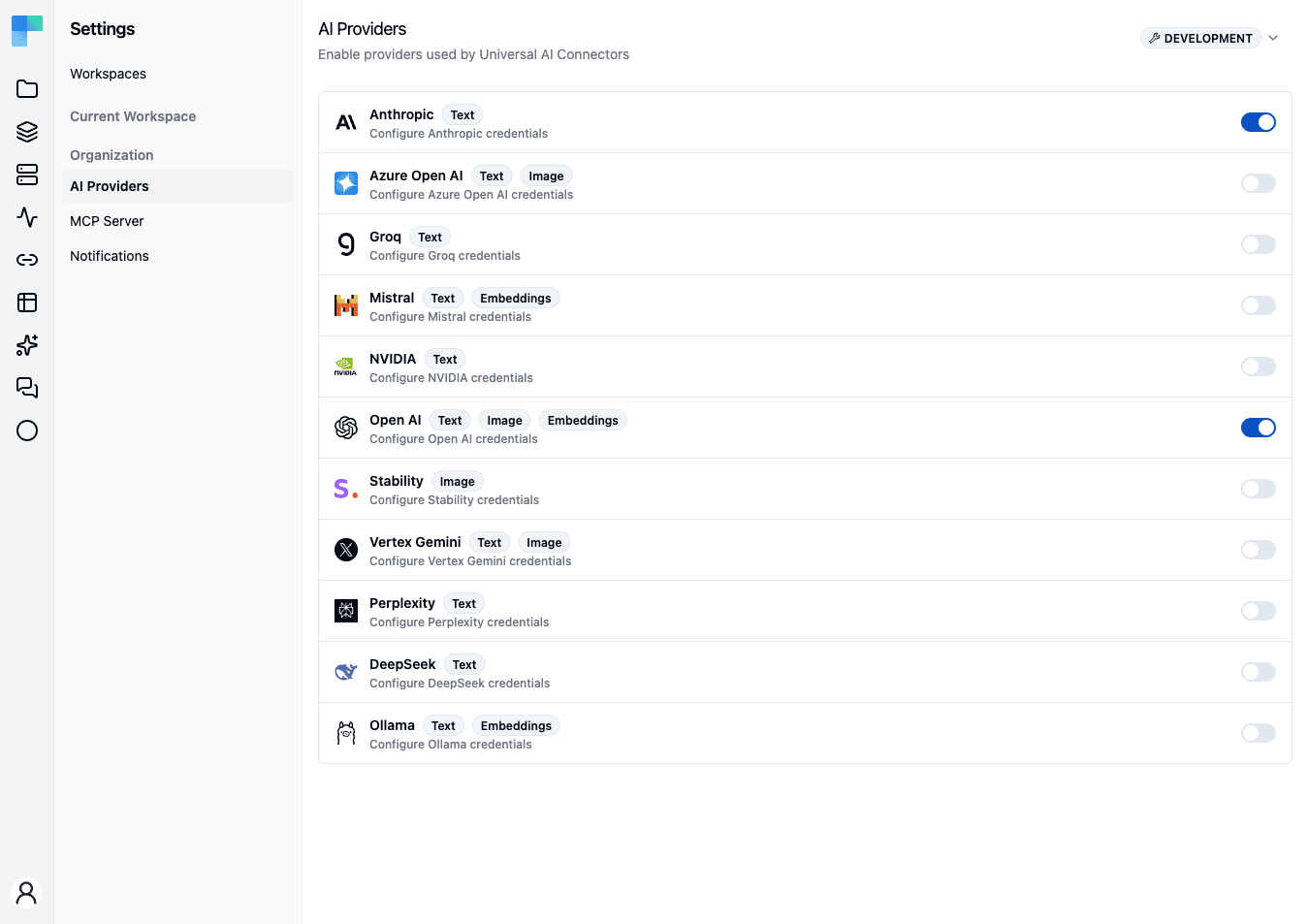
Activate a provider
- Go to Settings → AI Providers in the Automation workspace.
- Select the environment you're configuring (Development, Staging, or Production).
- Flip the provider's enable toggle on. If the provider has no credentials yet, its row expands to the credentials form automatically.
- Enter the credential - the provider's API Key for most providers, a Base URL for Ollama (which needs no key), or an Endpoint plus API key for Azure OpenAI - and click Save.
Once saved, the toggle stays on. To review or change a credential, expand the row and click Edit; to stop using a provider, toggle it off.
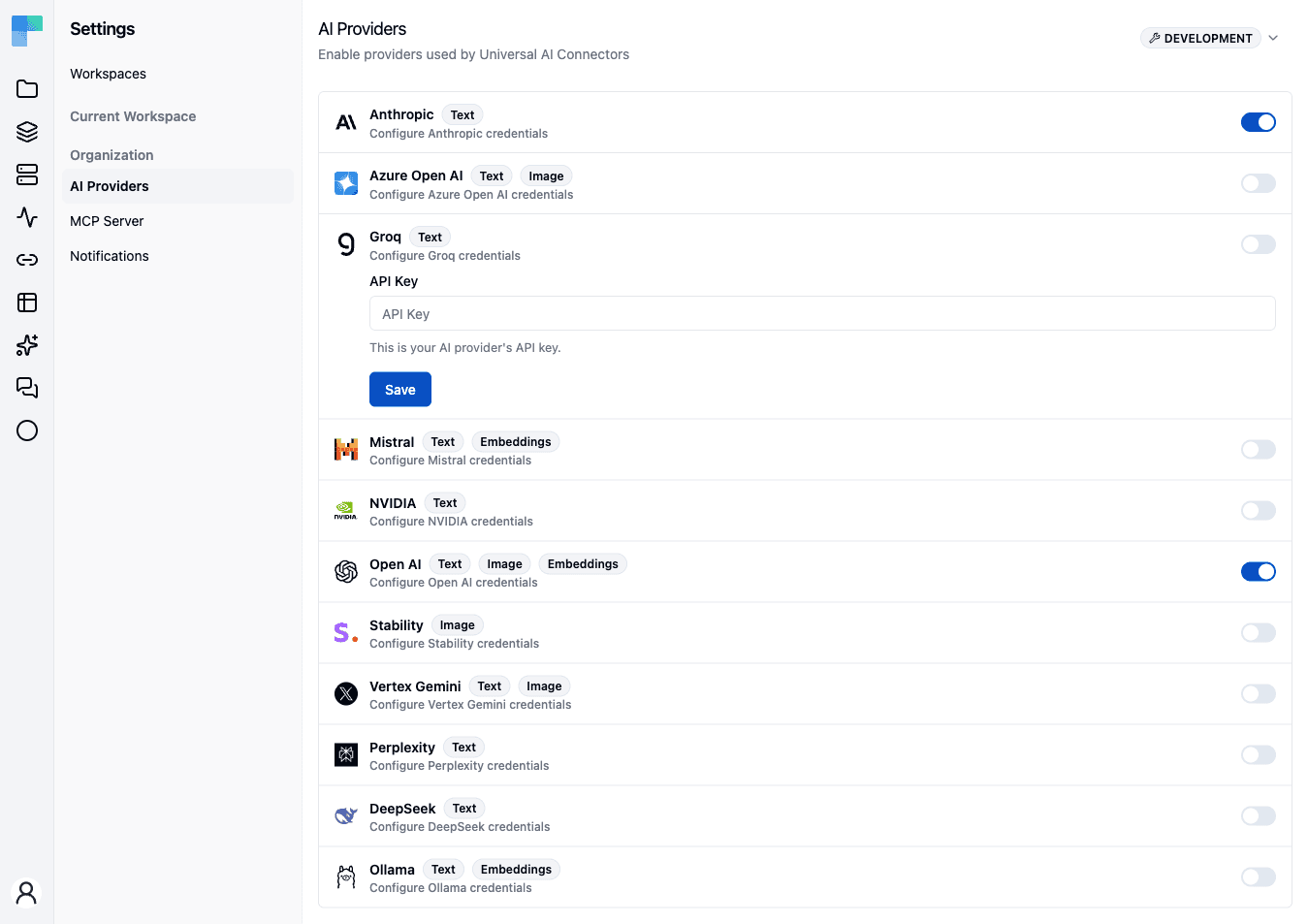
The API key is encrypted at rest, and the row only ever shows it back in obfuscated form. Repeat per environment - activating OpenAI in Development does not activate it in Production.
Available providers
The catalog includes Anthropic, OpenAI, Azure OpenAI, Mistral, Groq, NVIDIA, Vertex Gemini, Perplexity, DeepSeek, Hugging Face, Stability, and Ollama. Each row is tagged with badges for the capabilities it supports:
- Text - chat / text generation (most providers).
- Image - image generation (OpenAI, Azure OpenAI, Vertex Gemini, Stability).
- Embeddings - the embedding model used for semantic search (OpenAI, Mistral, Ollama).
- Copilot Docs - the provider currently backing the Copilot documentation corpus.
What uses activated providers
Once a provider is activated for an environment, it is available to:
- Universal AI components - workflow steps where you pick a provider from the catalog and then a model, instead of managing a separate connection.
- The Copilot model picker (coming soon) - choose which activated provider and model answers a Copilot conversation.
- The AI Hub (coming soon) - the same catalog backs the AI Hub's model selection.
- The Knowledge Base - document embedding uses the environment's activated embedding provider (OpenAI by default; Mistral and Ollama also provide embedding models).
Each feature resolves the key for the current environment, so the same workflow or conversation automatically uses the right credentials as it moves from Development to Production.
Default models
Every provider ships with a default model per kind - chat, embedding, and (for OpenAI) image generation - defined in configuration: bytechef.ai.provider.{chat,embedding,image}.<provider>.options.model, overridable through the matching environment variables. See the chat, embedding, and image model references. Model names are configuration-only - the AI Providers page stores credentials and enablement, not models.
The page still decides which default applies: features where ByteChef picks the model for you - the Copilot default, the workflow converter, the property Copilot, Knowledge Base embedding, and AI Hub image generation - resolve to the first enabled provider in the current environment (or the provider preferred via BYTECHEF_AI_COPILOT_PROVIDER, when set and enabled) and use that provider's configured model. Enabling or disabling a provider per environment redirects these features at the next request, without a restart. Universal AI workflow steps are unaffected - their authors pick the model per step.
Two providers have no default model on purpose, and are skipped by the default resolution until you set theirs explicitly:
- Azure OpenAI - the "model" is your deployment name; set
BYTECHEF_AI_PROVIDER_CHAT_AZURE_OPEN_AI_OPTIONS_MODELto it. - Ollama - the usable models are whatever your Ollama instance has pulled; set
BYTECHEF_AI_PROVIDER_CHAT_OLLAMA_OPTIONS_MODEL(e.g.deepseek-r1:8b) and, for Knowledge Base embedding,BYTECHEF_AI_PROVIDER_EMBEDDING_OLLAMA_OPTIONS_MODEL(e.g.qwen3-embedding:8b).
Choosing an embedding model
Pick the embedding model deliberately: documents already stored in Knowledge Bases are embedded with the model that was active at upload time, and switching to a different embedding model degrades semantic search over existing documents until they are re-embedded.
Embedding models
Embeddings are the vectors behind Knowledge Base search. Three of the catalog's providers offer them:
| Provider | Default model | Configuration key |
|---|---|---|
| OpenAI | text-embedding-3-small | BYTECHEF_AI_PROVIDER_EMBEDDING_OPEN_AI_OPTIONS_MODEL |
| Mistral | mistral-embed | BYTECHEF_AI_PROVIDER_EMBEDDING_MISTRAL_OPTIONS_MODEL |
| Ollama | (none - set one explicitly) | BYTECHEF_AI_PROVIDER_EMBEDDING_OLLAMA_OPTIONS_MODEL |
The corresponding property form is bytechef.ai.provider.embedding.<provider>.options.model. For
the full list of embedding keys see the
AI Embedding Model configuration reference.
Anthropic publishes no embedding models - an Anthropic-backed deployment still needs OpenAI, Mistral, or Ollama activated for embeddings.
Models are configuration
The model itself is always configuration - the AI Providers page stores credentials and
enablement, never model names. The API key can be configuration too
(BYTECHEF_AI_PROVIDER_OPEN_AI_API_KEY and friends), so a deployment can set the embedding model
and the key it authenticates with entirely by property.
Vector dimensions are fixed per deployment
Embedding models produce vectors of different widths - text-embedding-3-small is 1536 dimensions,
text-embedding-3-large is 3072 - and a pgvector column is declared with one width. The vector store
ships configured for 1536 dimensions
(spring.ai.vectorstore.pgvector.dimensions), so switching to a model of a different width means
changing that property as well; a mismatch fails at write time rather than degrading quietly.
Changing the embedding model
Chunks are embedded once, when their document is ingested. There is no re-embedding operation: changing the model affects documents added afterwards, and existing documents keep the vectors they were written with. Retrieval quality across the two sets degrades until the older documents are deleted and re-uploaded, which re-runs the whole pipeline. Plan a model change as a re-ingestion, and do it per environment so a Production knowledge base is not half-migrated.
Self-hosting: static keys
Instead of (or in addition to) activating providers through the UI, a self-hosted deployment can supply provider keys as configuration - for example BYTECHEF_AI_PROVIDER_OPEN_AI_API_KEY or BYTECHEF_AI_PROVIDER_ANTHROPIC_API_KEY. See the environment variables reference.
Precedence: a provider activated through the UI for an environment always wins. The static configuration key is used only as a fallback when no provider is activated for that environment. This lets an operator ship a default key while still letting each environment override it through the UI.
The Copilot documentation corpus is a special case: it is instance-global and embeds with its own dedicated key rather than the per-environment catalog. See AI Copilot → Documentation embeddings.
How is this guide?
Last updated on