
AI Agent
Build production-ready AI agents in ByteChef by composing a chat model, memory, retrieval, guardrails, and tools inside a single workflow node.
The AI Agent is a cluster-root workflow component that turns a chat model into a goal-directed assistant. It bundles five composable slots - a model, optional memory, optional retrieval, optional guardrails, and optional tools - into a single node you drop into any workflow. Each slot is filled by attaching another ByteChef component as a cluster element child, so you can swap providers, memory backends, or RAG strategies without rewiring the workflow.
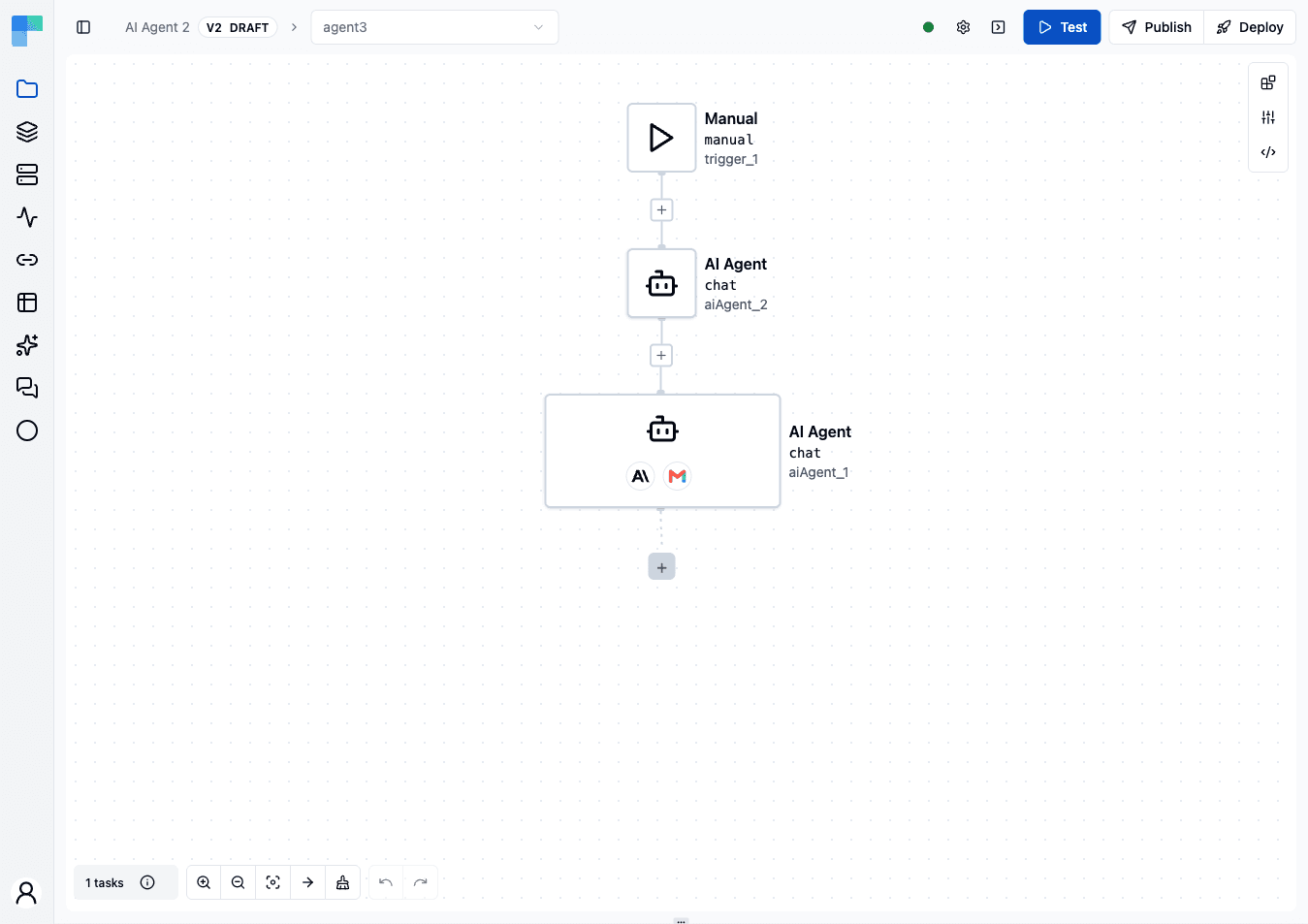
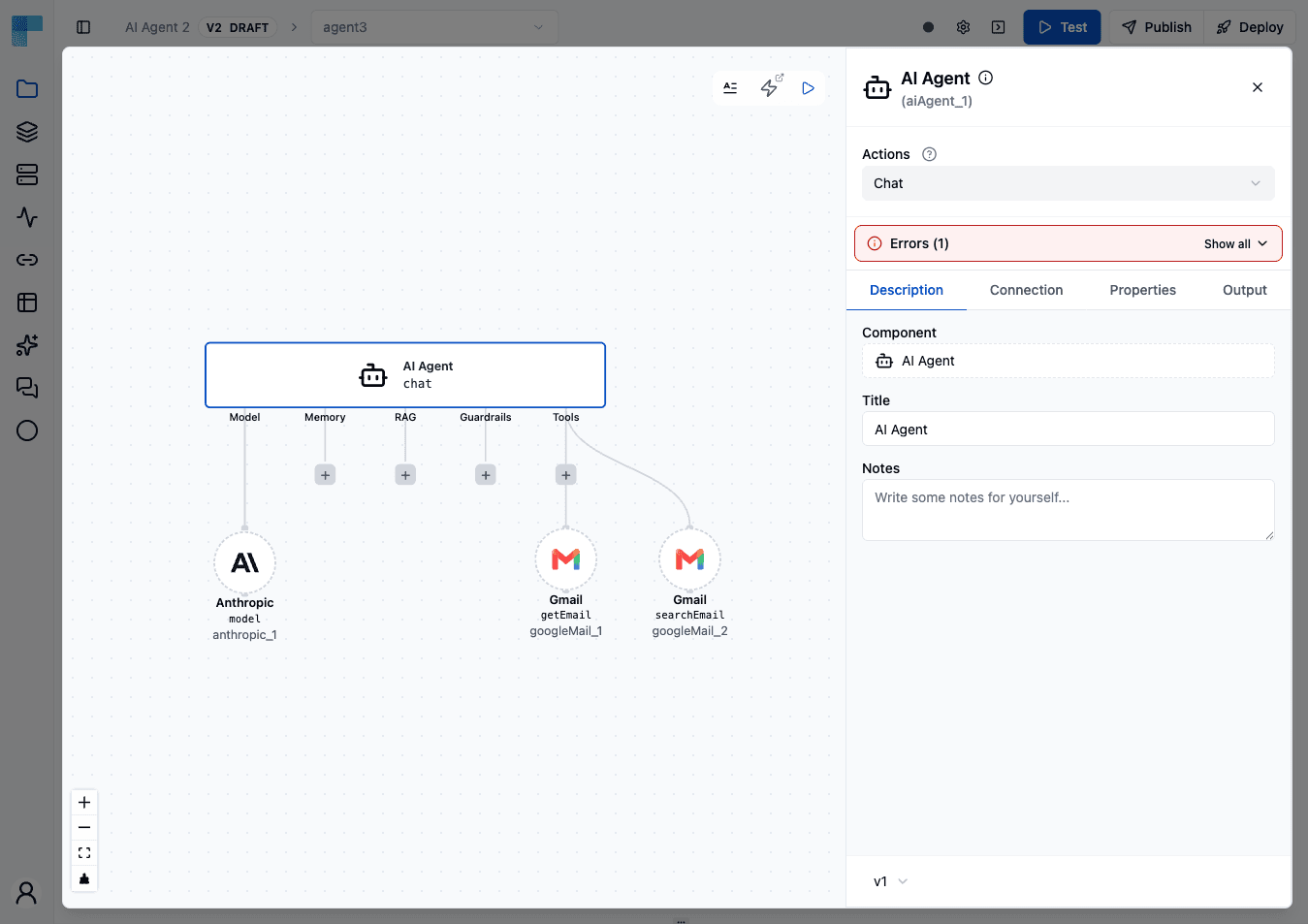
What You Can Build with the AI Agent
Goal-Directed Assistants
Wire a chat model, a memory backend, and a few tools into a single agent that holds multi-turn conversations, calls actions on your behalf, and remembers earlier turns across sessions.
Retrieval-Augmented Answers
Attach a RAG cluster element to ground answers in your own documents - product specs, runbooks, policy PDFs, support tickets - without fine-tuning a model.
Safe, Policy-Compliant Agents
Layer one or more guardrails in front of (and behind) the agent to block jailbreak attempts, redact PII and secrets, enforce URL allowlists, or keep the assistant on-topic.
Tool-Using Workflows
Expose any ByteChef workflow, custom function, or built-in action as a tool the agent can call. The agent decides at runtime which tool to invoke based on the user's request.
Reference: AI Agent Component
The AI Agent itself is published as a workflow component with three actions and a tool entry point:
| Component | Reference |
|---|---|
| AI Agent | aiAgent/v1 - chat, streamChat, realtimeChat |
The agent also exposes itself as a child tool that other agents (or the workflow chat surface) can call, enabling agent-of-agents compositions.
Creating an AI Agent
Building an AI Agent is a two-step flow: drop the agent node into a workflow, then attach the cluster elements that give it a model, memory, tools, and safety checks.
Step 1 - Add the AI Agent Node
- Open a workflow in the Workflow Editor.
- Click the + button on a canvas edge or the empty canvas to open the Components menu.
- Search for
AI Agentand click it. A new node appears on the canvas labelled AI Agent.
The new node renders as a cluster root - a special node type that hosts cluster element children inside its body rather than connecting them as sibling steps.
Step 2 - Open the AI Agent Editor
Click the AI Agent node body. The full-screen AI Agent Editor opens with a two-column layout:
- Left column - Configuration panel: the model selector, the prompt fields (Instructions to follow, User input, Attachments), and the Tools section.
- Right column - Testing panel: lets you send test prompts to the agent without leaving the editor, so you can iterate on configuration in place.
The remaining slots - Memory, RAG, and Guardrails - are not sections of this panel. Attach them in the advanced editor described next.
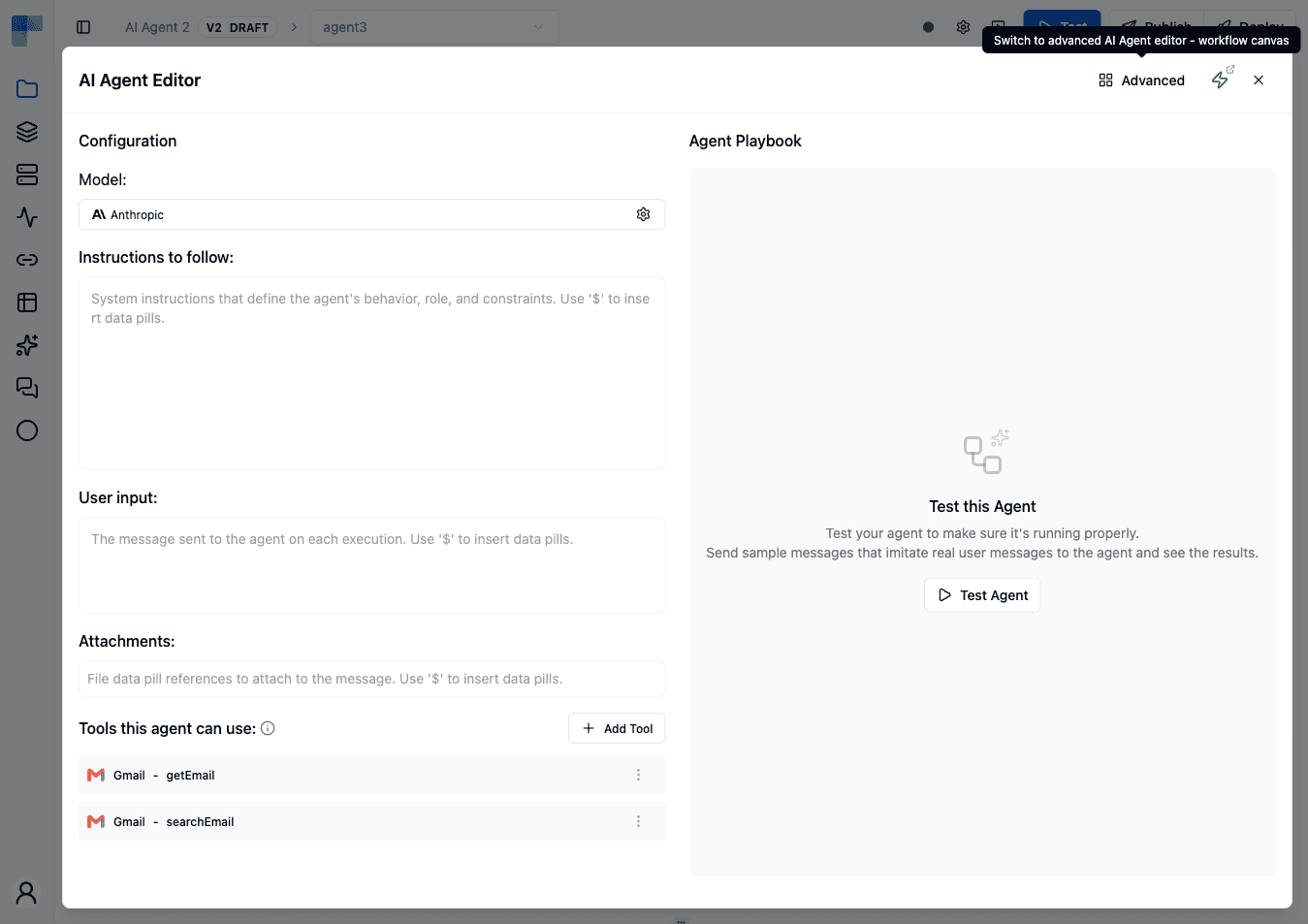
Simple vs Advanced editor
The two-column view above is the simple editor - the default. The Advanced button in the editor header switches to the advanced editor: a free-form canvas where each cluster element (model, memory, RAG, guardrail parents and their detectors, tools) is a node you wire up graphically. It is the only place every slot is reachable, so use it whenever you need memory, RAG, or guardrails - and when you want to see the whole element graph at once or rearrange nested structures the panel view abstracts away.
Both editors modify the same underlying configuration - switching loses nothing. Your last choice is remembered per agent node, so the editor reopens in the mode you left it in.
Step 3 - Attach a Model (required)
In the Model section, click Select a model.... The cluster element picker opens with all model-type components filtered in. Pick one (e.g. Anthropic, OpenAI, Ollama) and configure its connection and parameters in the panel that appears.
You must attach exactly one Model child before the agent can run.
Step 4 - Attach Chat Memory (optional, advanced editor)
Switch to the advanced editor and use the root node's Memory handle to open the picker filtered to chat-memory components. Pick one backend. Without a chat memory, the agent treats every turn as a brand-new conversation with no prior context.
Step 5 - Attach RAG (optional, advanced editor)
In the advanced editor, use the root node's RAG handle to attach a retrieval pipeline. The slot accepts one or more RAG children; each contributes its retrieved documents to the model context.
Step 6 - Attach Guardrails (optional, multiple allowed, advanced editor)
In the advanced editor, use the root node's Guardrails handle to attach a Check For Violations (inbound block) or a Sanitize Text (outbound mask) parent. Then attach child detectors (PII, Jailbreak, etc.) inside each parent.
The agent rejects configurations with more than one Check For Violations parent or more than one Sanitize Text parent - wire all your detectors as children of a single parent of each kind.
Step 7 - Attach Tools (optional, multiple allowed)
In the Tools this agent can use section, click + Add Tool to expose a workflow component, custom function, or another AI Agent as a callable tool. Each tool's name and description become part of the prompt the model sees, so the model can decide which to invoke.
Every tool offers an optional Tool Name and Tool Description above its own properties. Left blank, the underlying operation's name and description are used - set them when the default reads poorly to a model, or when two tools would otherwise be hard to tell apart. A tool name is limited to 64 characters made up of letters, digits, _, -, . and /; anything else, a space included, is rejected as you type.
Step 8 - Test in the Right Panel
Use the right-column Testing panel to send sample prompts. Tool calls, retrieved documents, and guardrail verdicts surface inline so you can verify the wiring before deploying the workflow.
Cluster Element Types
A cluster element is a child component slotted inside the AI Agent (the cluster root) rather than connected as a sibling step in the workflow graph. Each slot has a type that constrains which components can be attached and how many.
Internally each type is a ClusterElementType record (see ClusterElementDefinition.java) with:
name- the constant identifying the type (e.g."MODEL").key- the key elements of this type are stored under in the workflow JSON (e.g."model").label- the human-readable label shown in the UI and the element picker (e.g."Model").multipleElements- whether more than one child of this type is allowed.required- whether an element of this type is required.
The AI Agent registers six types. Each type binds to a Java functional interface that the agent invokes at execution time:
| Type name | JSON key | UI label | Functional Interface | Required | Multiple | What It Provides |
|---|---|---|---|---|---|---|
MODEL | model | Model | ModelFunction → Model<?, ?> | Yes | No | The LLM the agent calls to generate completions. Encapsulates the provider SDK, model parameters (temperature, max tokens), and response formatting. |
CHAT_MEMORY | chatMemory | Memory | ChatMemoryFunction → BaseChatMemoryAdvisor | No | No | An advisor that loads prior conversation turns into the model context and writes new turns back to the backend after each call. |
SESSION_REPOSITORY | sessionRepository | Session Repository | SessionRepositoryFunction | Yes | No | The storage backend for the Session chat memory - nested inside the Session memory child, not attached to the agent directly, and required by that child rather than by the agent. |
RAG | rag | RAG | RagFunction → Advisor | No | Yes | An advisor that retrieves relevant documents from a knowledge source and appends them to the prompt before the model call. |
GUARDRAILS | guardrails | Guardrails | GuardrailsFunction → Advisor | No | Yes | An advisor that validates input and/or output text against safety rules - blocking the request (Check For Violations) or rewriting matches in place (Sanitize Text). |
TOOLS | tools | Tools | BaseToolFunction (marker) | No | Yes | A list of actions the model can invoke during a turn. Each tool is exposed to the model as a callable function with a name, description, and JSON-schema parameter spec. |
The functional interfaces live in com.bytechef.platform.component.definition.ai.agent (plus BaseToolFunction in com.bytechef.component.definition.ai.agent). A component declares which type it implements via the ClusterElementType field on its ClusterElementDefinition. The agent's AbstractAiAgentChatAction reads these via ClusterElementMap.getClusterElement(<TYPE>) at execution time and dispatches to the resolved functional interface.
Why Types Matter
The type system is what lets the agent stay a single component while supporting hundreds of provider combinations: the agent code calls ModelFunction, not AnthropicChatModel or OpenAiChatModel - the type registration system resolves the bound implementation at runtime. Swapping providers means re-picking a child in the editor, not editing workflow JSON or restarting the server.
Model Slot
The Model slot binds a chat model to the agent. Exactly one model is required; choose the provider that matches your latency, cost, and capability profile.
| Provider | Reference |
|---|---|
| Anthropic | anthropic/v1 |
| Azure OpenAI | azureOpenAi/v1 |
| DeepSeek | deepseek/v1 |
| Groq | groq/v1 |
| Mistral | mistral/v1 |
| Nvidia | nvidia/v1 |
| Ollama | ollama/v1 |
| OpenAI | openAi/v1 |
| OpenRouter | openRouter/v1 |
| NanoGPT | nanoGpt/v1 |
| LiteLLM | liteLlm/v1 |
| Perplexity | perplexity/v1 |
| Gemini | gemini/v1 |
| Amazon Bedrock | amazonBedrock/v1 |
Beyond the chat model used by the agent, several provider components also ship standalone workflow actions - image generation, speech synthesis, audio transcription, OCR, embeddings - usable outside the agent; see each provider's reference page. Some AI components are standalone-only and cannot fill this slot: stability/v1, for example, ships a Create Image action but no model cluster element.
Model routers
OpenRouter, NanoGPT, and LiteLLM are routers (aggregators) rather than single-vendor providers: one connection fronts hundreds of models from many vendors, so you switch or A/B models by changing only the model name instead of adding a connection per vendor. Reach for a router when you want to experiment across models freely, or route all traffic through one billing and governance point; reach for a direct provider (Anthropic, OpenAI, Gemini, …) when you want a first-party connection to a single vendor.
Chat Memory Slot
The advanced editor labels this slot simply Memory. The cluster elements that fill it are still the chat-memory components described below.
Chat memory lets an agent recall earlier turns of the same conversation. The slot is labelled Memory in the advanced editor and accepts at most one memory child. Choose a backend based on durability, query latency, and whether you want vector-similarity recall instead of raw transcript playback.
| Backend | Reference | Notes |
|---|---|---|
| Built-in | chatMemory/v1 | Default in-process store with addMessages, getMessages, deleteConversation, listConversations. |
| In-Memory | inMemoryChatMemory/v1 | Process-local; resets on restart. |
| JDBC | jdbcChatMemory/v1 | Persists to any JDBC-compatible database. |
| Redis | redisChatMemory/v1 | Low-latency, ephemeral or persisted depending on Redis config. |
| MongoDB | mongoDbChatMemory/v1 | Document store; good fit for transcript replay. |
| Cassandra | cassandraChatMemory/v1 | Wide-column store for high-throughput workloads. |
| Neo4j | neo4jChatMemory/v1 | Graph-backed; useful when conversation context links into other graph entities. |
| AWS S3 | awsChatMemory/v1 | Persists transcripts to Amazon S3, routed to a per-tenant bucket; durable object storage for long-lived conversations. |
| Vector Store | vectorStoreChatMemory/v1 | Recalls semantically similar prior turns instead of raw chronological history. |
| Session (coming soon) | sessionChatMemory/v1 | Session-scoped memory that hosts a nested Session Repository child for storage - pick a repository backend (Built-in, In-Memory, JDBC, Redis, or AWS S3) inside the Session memory element. |
Chat memory vs Auto Memory
Coming soon. Auto Memory is on the upcoming release track and is not yet available in the latest released version of ByteChef. Chat memory, described above, is available today.
Chat memory and Auto Memory solve different problems, and an agent can use both at once:
- Chat memory (this slot) replays the transcript of the current conversation - it is what makes turn five remember turn one. It is keyed by conversation and says nothing across conversations.
- Auto Memory (a tool from the Agent Utils toolset) stores durable facts the agent decides are worth keeping - preferences, learned context, decisions - and makes them available in every future conversation of the same deployment. In automation workflows the memory is scoped to the project deployment; in embedded workflows it is scoped to the tenant's integration instance, so one tenant's agent never sees another tenant's memories. During editor test runs the tool is inert - nothing is written until the workflow runs under a real deployment.
This is the same auto-memory capability behind the AI Hub Memories page: there the assistant saves facts per user; inside an AI Agent the facts belong to the deployed workflow. Attach the Auto Memory tool in the Tools slot to enable it - see the Agent Utils toolset.
RAG Slot
RAG (retrieval-augmented generation) lets the agent pull text from a knowledge source at query time and pass it to the model as additional context. The slot accepts one or more RAG children; every attached pipeline runs and contributes documents to the augmented prompt.
| Strategy | Reference | Use When |
|---|---|---|
| Modular RAG | modularRag/v1 | You need fine-grained control: query transformer, query expander, document retriever, document joiner, query augmenter as separate stages. |
| Question-Answer RAG | questionAnswerRag/v1 | You want a single high-level "ask + retrieve + answer" pipeline with sensible defaults. |
| Vector Store Document Retriever | vectorStoreDocumentRetriever/v1 | Embed any vector store as a retriever inside the Modular RAG pipeline. |
The Modular RAG stages are themselves swappable cluster elements: query transformers (Compression, Rewrite, Translation), a Multi-Query Expander, the Vector Store Document Retriever, a Concatenation Document Joiner, and a Contextual Query Augmenter - each configured as a child of the Modular RAG element.
Compatible Vector Stores
The retriever stage can read from any of the supported vector backends:
| Vector Store | Reference |
|---|---|
| Couchbase | couchbase/v1 |
| Knowledge Base | knowledgeBase/v1 |
| MariaDB Vector | mariaDbVectorStore/v1 |
| Milvus | milvus/v1 |
| MongoDB Atlas | mongodbAtlas/v1 |
| Neo4j | neo4j/v1 |
| Oracle | oracleVectorStore/v1 |
| pgVector | pgVector/v1 |
| Pinecone | pinecone/v1 |
| Qdrant | qdrant/v1 |
| Redis | redisVectorStore/v1 |
| S3 Vector Store | s3VectorStore/v1 |
| Typesense | typesense/v1 |
| Weaviate | weaviate/v1 |
RAG slot vs. search tool
The RAG slot is always-on retrieval: every turn runs the pipeline and prepends the retrieved documents to the prompt, whether or not the question needs them. When you'd rather the agent decide when to look something up, attach the vector store's (or Knowledge Base's) Search tool in the Tools slot instead - the model then calls it only on the turns that need retrieval. The two are complementary; an agent can use both.
Guardrails Slot
Guardrails are content-safety checks that run on text flowing through the agent, attached in the advanced editor. The slot accepts one or more guardrail parent actions; the agent rejects requests with more than one Check For Violations or more than one Sanitize Text parent attached.
Not to be confused with AI Guardrails (coming soon) - a workspace-level policy (PII/secret redaction, blocked terms, moderation, injection detection) that will run on every AI Agent turn regardless of whether you attach anything here. It is on the upcoming release track and is not yet available in the latest released version of ByteChef. The cluster elements below are the per-node checks available today.
| Parent Action | Reference | When to Use |
|---|---|---|
| Check For Violations | checkForViolations/v1 | Block requests that fail any attached check (jailbreak, NSFW, secret-leak, off-topic). |
| Sanitize Text | sanitizeText/v1 | Mask matched spans in place (PII, URLs, secrets) without blocking. |
Child detectors
These attach inside a Check For Violations or Sanitize Text parent.
| Detector | Stage | Reference |
|---|---|---|
| PII | Preflight (rule) | pii/v1 |
| Secret Keys | Preflight (rule) | secretKeys/v1 |
| URLs | Preflight (rule) | urls/v1 |
| Custom Regex | Preflight (rule) | customRegex/v1 |
| Keywords | Preflight (rule) | keywords/v1 |
| Jailbreak | LLM classifier | jailbreak/v1 |
| NSFW | LLM classifier | nsfw/v1 |
| Topical Alignment | LLM classifier | topicalAlignment/v1 |
| LLM PII | LLM classifier | llmPii/v1 |
| Custom | LLM classifier | custom/v1 |
See the dedicated Guardrails section for behaviour details, telemetry, and threshold tuning.
Tools Slot
Tools turn workflow components into actions the agent can call mid-conversation. The slot accepts any number of tool children; the agent picks which to invoke based on the user's prompt and the tool descriptions.
| Tool source | Reference | Notes |
|---|---|---|
| Agent Utils | aiAgentUtils/v1 | Built-in utility toolset - see the table below. |
| Any workflow component | Any *_v1.mdx in the components reference | Most ByteChef actions can be exposed as tools - see the component's chat / realtimeChat action property tables for tool wiring. |
| MCP Client | mcpClient/v1 | Connect the agent to an external MCP server and expose that server's tools to the model. |
| Vector store / Knowledge Base search | The Search tool cluster element on any supported vector store or knowledgeBase/v1 | Let the agent search a vector store or Knowledge Base on demand - retrieval as a tool the model chooses to call, complementing the always-on RAG slot. |
| Script | script/v1 | Run custom Python, JavaScript, or Ruby as a tool when no built-in action fits. |
| AI Agent | aiAgent/v1 | Let one agent call another as a tool, for the agent-of-agents compositions described above - a sub-agent owns a self-contained domain and returns a result to its caller. |
Supplying tool parameters with fromAi
When you attach a tool, you see its full input form, and for every parameter you decide who fills it:
- Fix it yourself - type a constant (or a data pill). The value is identical on every call and the model never sees or controls it.
- Let the model supply it - set the field to a
fromAi(...)expression. At call time the model provides the value, and the parameter is advertised to the model as part of the tool's generated JSON-schema signature.
The expression form is:
=fromAi('<name>', '<type>', { description: '<hint>', required: true })name(required) - the parameter name the model sees. Non-alphanumeric characters are replaced with_, and the name is truncated to 64 characters.type(optional, defaultSTRING) - one ofSTRING,NUMBER,INTEGER,BOOLEAN,ARRAY,OBJECT,DATE,TIME,DATE_TIME.- third argument (optional) - a map with
description(steer the model on what to pass),defaultValue,options(restrict to an enum of allowed values), andrequired(defaultfalse).
This is what makes a tool partly fixed, partly agent-driven. For example, a "send Slack message" tool can pin the channel with a constant while letting the model write the body:
channel: general
text: =fromAi('text', 'STRING', { description: 'the message body to post' })
The same fromAi mechanism configures which tool parameters the AI fills for MCP server tools and embedded MCP tools - this page is the reference for its syntax.
The Agent Utils toolset
Agent Utils ships a set of built-in tools you can attach individually. See Agent Utils Tools for a closer look at each.
Only Skills can be attached to an AI Agent today. The rest are built, but they declare the
CLAUDE_CODE_TOOLS cluster-element type, which the AI Agent component does not consume - so they
do not appear in its Tools slot no matter how the agent is configured.
| Tool | What the agent can do with it |
|---|---|
| Skills | Consult operator-authored skills on demand - see Skills for authoring and managing them. |
The following Agent Utils tools are on the upcoming release track and are not yet available in the latest released version of ByteChef:
| Tool (coming soon) | What the agent can do with it |
|---|---|
| Brave Web Search | Search the web (with domain filtering) via the Brave Search API. |
| Smart Web Fetch | Fetch and AI-summarize web page content, with caching. |
| File System / Glob / Grep | Read, write, and edit files; match file patterns; regex-search file contents. |
| Shell | Execute shell commands with timeouts and background management. |
| Task | Delegate complex sub-tasks to specialized sub-agents that run in parallel. |
| Todo Write | Maintain a structured task list with state tracking across the run. |
| Ask User Question | Pause mid-turn and ask the user a clarifying question - rendered as an interactive prompt in the chat UI; the run resumes with the user's answer. |
| Auto Memory | Persist durable facts that survive across conversations - scoped to the project deployment (automation) or integration instance (embedded). Complements chat memory, which only recalls the current conversation; see Chat memory vs Auto Memory. |
| List Directory | List the contents of a directory. |
| Agent Client | Delegate a task to a remote agent over the A2A (Agent2Agent) protocol. |
Skills as tools
Skills are a special kind of tool - operator-authored knowledge packs the agent can consult on demand. See the Skills page for authoring guidelines, supported file formats, and the .skill archive structure.
Action Catalogue
The AI Agent exposes three actions, each suited to a different consumption pattern:
Chat
Synchronous request/response. Sends the user prompt through the agent, runs all configured guardrails and tools, and returns the final assistant message in one shot. Use this for API integrations where the caller waits for the full answer.
Reference: aiAgent/v1 → chat
Chat (stream)
Server-sent-event streaming. Emits assistant tokens as they're generated, so a UI can render progressively. Output-stage LLM classifiers are skipped per chunk, since running an LLM classifier per token would exhaust rate limits.
Reference: aiAgent/v1 → streamChat
Structured Output
By default the agent returns free-form assistant text. When a downstream step needs to branch on or map the answer, configure structured output so the agent returns validated JSON instead. Two fields on the chat action control this:
- Response format (
responseFormat) - switch the response from plain text to a JSON object. - Response schema (
responseSchema) - supply a JSON Schema describing the shape you expect. ByteChef builds a structured-output converter from it and instructs the model to conform.
The generated output is validated against the schema before it leaves the step, so a malformed or incomplete object fails the step rather than flowing downstream as bad data. Each field of the result then surfaces as a typed data pill you can reference in later steps.
Configure both on the agent's chat action - see aiAgent/v1. The same responseFormat / responseSchema pair is available on the standalone LLM chat actions of the individual model providers (OpenAI, Anthropic, Ollama, …).
How a Turn Executes
- Inbound guardrails - every
Check For Violationsparent runs against the raw user prompt. If any child returns a violation, the request is short-circuited and the LLM is never called. - Chat memory load - if a Chat Memory child is attached, prior turns for the same
conversationIdare loaded and prepended to the model's context. - RAG retrieval - if a RAG child is attached, it runs to pull relevant documents and append them to the model context.
- Model call - the model generates a response, possibly with tool calls.
- Tool execution - if the model emits tool calls, the agent dispatches them to the matching Tools child, feeds results back to the model, and loops until the model produces a final answer.
- Outbound guardrails - every
Sanitize Textparent runs over the final assistant text and masks any matches. Tool-call-only generations (no assistant text) are forwarded unmodified, since there is no assistant text to rewrite. - Chat memory write - the new user/assistant turn is appended to memory for the next call.
Best Practices
Pick the Cheapest Model that Hits Your Quality Bar
A small fast model (Haiku-class, gpt-4o-mini, gemini-1.5-flash) handles classifier work and most tool-calling reliably. Reserve frontier models for the planning step where reasoning quality changes the outcome.
Always Pair Memory with a Stable conversationId
If you regenerate the conversationId on every turn, the agent loses prior context and pays the model for a fresh prompt every time. See chatMemory/v1 for the conversation lifecycle.
Layer Inbound and Outbound Guardrails
Run Check For Violations on the inbound side for adversarial signals (jailbreak, NSFW, secret leaks). Run Sanitize Text on the outbound side for accidental leaks from tool results or RAG passages.
Keep Tool Descriptions Tight
The model decides which tool to call based on the tool's description. A vague description ("do stuff") leads to the model picking the wrong tool or skipping the right one. Write the description as if it were a function docstring - what the tool does, what inputs it needs, what it returns.
Test with Evals
Use Evals (coming soon) to catch regressions when you swap a model, add a guardrail, or change a tool. Wire one or two scenario judges per critical user-journey so a single failing eval surfaces in the run summary.
Frequently Asked Questions (FAQs)
How is this guide?
Last updated on